




If you’re planning a Canada job search as an immigrant, Job Bank Canada should be your first stop. It’s free, government-run, and one of the few platforms where you can find verified LMIA jobs in Canada.
This guide explains what Job Bank Canada is, who can use it, and exactly how to find Canada work visa jobs in 2026.
Table Of Content
1What Is Job Bank Canada?2What Is Job Bank Canada Used For?3Key Features of Job Bank Canada4How to Create a Job Bank Canada Account (Step-by-Step Process)5How to Search for Jobs on Job Bank Canada6Difference Between Job Bank Canada and Private Job Portals7Conclusion: Is Job Bank Canada Worth Using?8Frequently Asked Questions
What Is Job Bank Canada?
Canada’s Job Bank is the official job portal of the Government of Canada, managed by Employment and Social Development Canada (ESDC). Job Bank has over 100 years of experience supporting Canada’s labour market. What started as paper job boards has evolved into a modern digital platform.
It connects employers with:
- Canadian citizens
- Permanent residents
- Foreign workers (where allowed)
Unlike private job portals, every listing comes from registered employers.
What Is Job Bank Canada Used For?
Job Bank Canada publishes thousands of job postings every month. It offers job-matching tools that recommend roles based on a user’s skills, education, and experience. The platform also provides reliable labour market information, including wage rates, employment trends, and in-demand occupations.
Job seekers can:
- Create and manage job profiles
- Set up job alerts
- Save favourite job listings
- Access career planning tools, resume tips, and application notifications
Key Features of Job Bank Canada
The key feature of Job Bank is that it offers a set of practical tools designed to simplify job search and recruitment across the country. The platform focuses on skill-based matching, reliable labour market insights, and faster applications.
Job Search Tools
Job seekers can browse thousands of active job postings across Canada. The Job Match feature recommends roles based on skills, education, and work experience. Users can also set up Job Alerts to receive twice-daily notifications for new listings.
Additional tools include:
- Saving favourite job postings
- Filtering jobs by location, occupation, or student roles
- Using the Job Bank mobile app to search and apply on the go
Resume and Profile Features
Job seekers can create a free account to build professional resumes using ready-made templates. Resumes and documents can be uploaded for direct applications. Employer profiles allow users to learn more before applying.
With a Plus account, users gain access to:
- One-click invitations from employers
- Feedback on rejected applications
Labour Market Insights
Job Bank Canada provides up-to-date labour market data, including:
- Wage information
- Occupational outlooks
- Employment trends by region
Career exploration tools help users plan based on skills, education, and location. Employers benefit from free job postings, applicant management dashboards, AI transparency indicators, and access to hiring incentives. To improve your chances of success on Job Bank Canada, target occupations with strong demand. Explore our list of the Top 10 Most In-Demand Jobs in Canada for Immigrants before applying.
How to Create a Job Bank Canada Account (Step-by-Step Process)
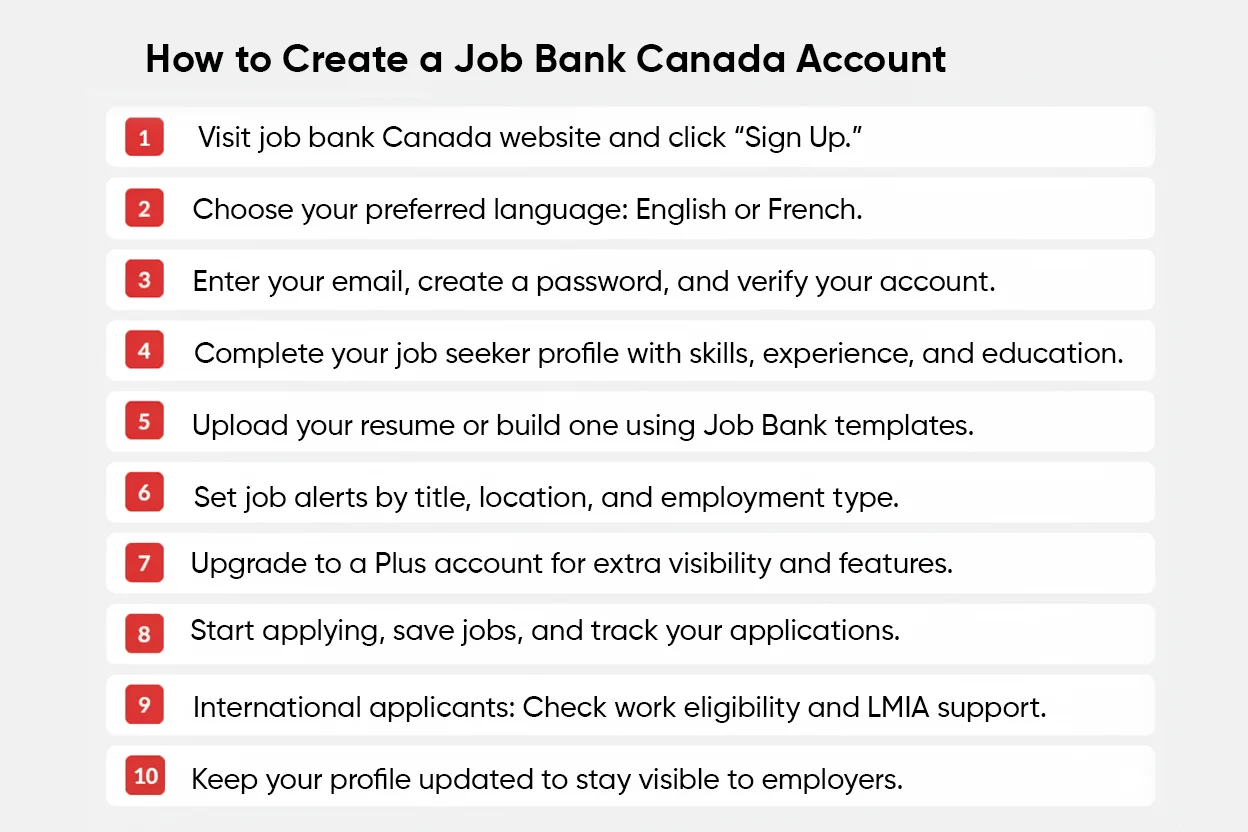
Creating a Job Bank Canada account is free and gives you access to advanced job search and career tools. A registered account allows you to receive job alerts, apply directly to employers, build resumes, and access labour market insights.
The registration process is simple and takes about 10–15 minutes.
Step 1: Visit the Official Job Bank Website
Go to www.jobbank.gc.ca using a desktop or mobile browser. On the homepage, click the “Sign up” button located at the top of the page.
Step 2: Choose Your Language
Select your preferred language:
- English
- French
You can switch languages later from the site settings if needed.
Step 3: Create Your Login Credentials
Enter a valid email address and create a secure password.
Job Bank will immediately send a confirmation email to verify your account.
Open the email and click the verification link to continue.
Step 4: Set Up Your Job Seeker Profile
Once your email is verified, you’ll be asked to complete your profile. This step is important because the Job Bank uses this information for job matching.
You’ll need to add:
- Personal details
- Work experience and job titles
- Skills and certifications
- Education and training
A complete profile improves the quality of job recommendations.
Step 5: Upload or Build Your Resume
You can either:
- Upload an existing resume
- Create one using Job Bank’s professional resume templates
Resumes created on the platform can be sent directly to employers.
Step 6: Activate Job Alerts and Preferences
Choose your preferred:
- Job titles
- Locations
- Employment type (full-time, part-time, student jobs)
The Job Bank will send email alerts twice daily when matching jobs are posted.
Step 7: Upgrade to a Plus Account (Optional)
During setup, you can opt for a Plus account, which provides additional features such as:
- One-click employer invitations
- Feedback on rejected applications
- Enhanced job matching visibility
This option is recommended for active job seekers.
Step 8: Start Applying for Jobs
Once your account is active, you can:
- Apply directly through Job Bank
- Save job postings
- Track application status
- View employer profiles
Important Notes for International Applicants
- Applicants outside Canada should carefully check work authorization requirements mentioned in each job posting.
- Only apply for roles where employers accept foreign workers or offer LMIA support.
- Keep your profile updated to improve visibility to employers.
How to Search for Jobs on Job Bank Canada
Searching for jobs on Job Bank Canada is straightforward, even if you’re using the platform for the first time. You can search directly from the homepage, but creating a free account unlocks personalized job matches, alerts, and faster applications.
Step 1: Go to the Job Bank Canada Homepage
Visit www.jobbank.gc.ca. At the top of the homepage, you’ll see the main Job search bar.
You can search without logging in, but signing in improves accuracy and saves time.
Step 2: Enter Job Details
In the search bar:
- Enter keywords such as a job title (e.g., Nurse, Accountant, IT Developer)
- Add a location (city, province, or postal code)
- Select a search radius if required
- Click Search to view available job listings.
Step 3: Refine Your Search Using Filters
Use filters on the results page to narrow down listings:
- Salary range
- Job type (full-time, part-time, student)
- Experience level
- Education requirements
- Language preferences
- Date posted
These filters help remove irrelevant jobs and focus on suitable roles.
Step 4: Review Job Listings Carefully
Click on individual job listings to see:
- Employer details
- Job responsibilities
- Wage and working hours
- Location and employment type
- Application method
Look for “Direct Apply” badges, which allow you to apply immediately through Job Bank.
You can also save jobs to review later.
Step 5: Apply or Save Jobs
If you are registered and logged in:
- Apply directly using your Job Bank resume, or
- Follow the employer’s application instructions
Saved jobs remain accessible in your dashboard.
Step 6: Set Up Job Alerts
To avoid missing new opportunities:
- Log in to your account
- Save your search criteria
- Enable Job Alerts
Job Bank will send email notifications twice daily when matching jobs are posted.
Difference Between Job Bank Canada and Private Job Portals
Job Bank Canada is a government-run employment platform, while private portals such as Indeed and LinkedIn operate as commercial job boards. The key difference lies in purpose. Job Bank focuses on transparency, public access, and verified listings. Private portals prioritize reach, speed, and monetization.
| Aspect | Job Bank Canada | Private Portals (Indeed, LinkedIn) |
|---|---|---|
| Ownership | Government-run (free and objective) | Privately owned (ad- and subscription-driven) |
| Job Volume | Thousands of verified job postings | Millions of aggregated listings |
| Focus | Skill-based and labour market matching | High-volume recruitment and networking |
| Features | Job Match AI, wage data, NOC-based roles, privacy-focused | Messaging, networking, company reviews, AI recommendations |
| Salary Transparency | Mandatory salary details | Often optional |
| Language Support | Fully bilingual (English & French) | Mostly English |
| Cost to Job Seekers | Completely free | Free with paid upgrades |
| Data Reliability | Trusted for EI and labour market use | Can include duplicates or outdated listings |
Conclusion: Is Job Bank Canada Worth Using?
Yes! Job Bank Canada is absolutely worth using, especially if you’re serious about finding legitimate job opportunities in Canada.
Here’s why it’s valuable:
Free and unbiased: No ads, subscriptions, or paywalls.
Verified postings: Employers are registered and jobs often include wage and role details.
Labour market insights: You get up-to-date wage data, employment trends, and job outlooks.
Immigration-friendly: Ideal for newcomers and foreign workers, with many employers open to LMIA or international applications.
Career tools: Job alerts, resume builders, and job matching help streamline your search.
However, it’s not the only tool you should use. Pairing Job Bank Canada with private portals like Indeed, LinkedIn, or Glassdoor can give you a broader view of opportunities and networking options.



My name is Chinare l am a chef, a well-known chef l am comıng toCanada to work l am suffering , please help me
Hi Chinare,
Thank you for your interest.
We are an immigration consultancy and do not offer direct job opportunities. However, Chef’s are in demand in countries like Canada and Australia.
We can guide you through the right immigration pathways and help you explore opportunities in your field.
Please share your qualifications and experience, and we’ll assist you further.
I want to live in Canada ,living here is difficult. I am writing from Azerbaijan. My husband is a telephone technician . I am taking care of 2 small children . I have a secandary education ,but I have a lot of do. Please help
Hi Ulduz Azadova,
Thank you for reaching out and sharing your situation with us 😊
Please note that we currently have offices in India, UAE, Australia, and Canada, and we do not have a branch in Azerbaijan.
We recommend connecting with a trusted immigration consultancy in your country who can guide you based on your location and requirements.
We truly wish you and your family all the very best for your future and your plans to move to Canada
I am writing to express my strong interest in applying a work in canada.I am a hardworking and reliable individual from the Philippines, and I am very eager to start my career and build a future in Canada.
Although I am early in my professional journey, I have gained valuable experience and discipline during my time as an Internship Staff at 2GO Interisland Cruise. In this role, I was responsible for handling luggage, assisting passengers, and ensuring that items were stored safely and correctly. This experience taught me how to work fast, pay attention to details, and handle goods with careskills. That’s why I look forward to work in canada.
Hi Abegail,
Thank you for reaching out and for your interest.
We can guide you through the right immigration pathways and help you explore opportunities in your field.
Please share your qualifications and experience, and we’ll assist you further. BOOK A FREE CONSULTATION NOW
HI, I leave in Nigeria and I will love to work and live in Canada. am a professional teacher here in Nigeria. my problem is getting my profile ready to start hunting for jobs through job bank Canada, but it is asking me for social security number/ social insurance number. please what do i do because I don’t have it. please help me.
Hi Olumide,
Thank you for reaching out and for your interest.
We can guide you through the right immigration pathways and help you explore opportunities in your field.
Please share your qualifications and experience, and we’ll assist you further. BOOK A FREE CONSULTATION NOW
Kam ke liye agriculture ka kam
Hi Arshad,
Thank you for your interest.
CanApprove can assist you. Please note that we are not a job consultancy, so we do not provide overseas job placements or recruitment services.
Our immigration experts can assess your profile and guide you on the most suitable work visa or employer-sponsored visa options based on your qualifications, work experience, and the country you wish to migrate to.
Please share your qualifications and experience, and we’ll assist you further. BOOK A FREE CONSULTATION NOW!
Looking for a visa sponsorship jobs without Canadian sign
Hi Stephen,
If you’re looking for visa-sponsored jobs in Canada but don’t have a Canadian job offer yet, the options can depend on your occupation, experience, and eligibility for different immigration pathways.
You can also explore our CanApprove blogs for more information on Canadian work permits, LMIA, job opportunities and immigration pathways. This can help you understand what options may be suitable for you before applying.